
When someone in your town searches for ‘restaurants near me’ or ‘indian restaurant near me’, Google shows a map with three listings before almost anything else. If your restaurant is not one of those three, most of those hungry customers never see you. Restaurant SEO is the work of earning your place there, and for a local business it is one of the most valuable things you can do because the people searching are usually ready to eat today.
What restaurant SEO actually means
Restaurant SEO is a type of local SEO. Instead of trying to rank for the whole country, you are trying to appear when people near you search for food. Google decides who to show using three broad ideas: how relevant your business is to the search, how close you are to the person searching, and how well known and trusted you appear. You cannot change how close you are, but you can improve the other two.
Step 1: Complete your Google Business Profile
Your Google Business Profile is the single most important asset. Make sure your business name matches your shop sign exactly, because adding keywords to the name can get your listing suspended. Choose the right main category, such as Indian restaurant or Pub, and add secondary categories that describe what else you do, such as takeaway or delivery. Add your phone number, website, opening hours including bank holidays, and links for booking and ordering. Fill in the attributes that apply to you, for example dine in, takeaway, delivery, halal, vegetarian options, outdoor seating and wheelchair access. Write a clear description of what makes you different in a few sentences, in natural language.
Step 2: Photos, menu and posts
Profiles with plenty of real photos get more attention, because customers use them to decide. Upload clear pictures of your signature dishes, the inside and outside of the restaurant, and your team. Add your menu to the profile and keep it up to date. Use Google Posts for offers, events and new dishes. Posting regularly shows the profile is active and gives people another reason to choose you.
Step 3: Earn and answer reviews
Reviews are one of the strongest signals for both Google and customers. Ask every happy customer for a review, reply to every review you receive, and mention the dishes people praise in your replies. We cover this in detail in our guide to getting more Google reviews for your restaurant.
Step 4: Make your website help your profile
Your website does not need to be complicated, but it should do a few things well. Put your menu on the page as text rather than only as a PDF or image so Google can read it. Show your address, phone number and opening hours clearly. If you have more than one branch, create a separate page for each. Use a page title that says what you are and where, for example ‘Indian restaurant in Leicester’. Make sure the site loads quickly on a phone, because most local searches happen on mobile. Add Restaurant structured data so Google understands your menu, cuisine and opening times.
Step 5: Keep your details consistent everywhere
Your name, address and phone number should be written the same way on your website, Facebook page, Instagram, delivery apps and any directories. Inconsistent details confuse Google and customers. Check the listings you have forgotten about, because old addresses and old numbers are common problems after a move or rebrand.
Step 6: Build local signals
Local links and mentions tell Google you are a real part of the community. Get listed by local food bloggers, news sites, community groups and event organisers. Write about your area on your own blog, for example a guide to eating near a local landmark, or the story behind a seasonal menu. Our blog and case studies show how we do this for restaurants.
Step 7: Measure what matters
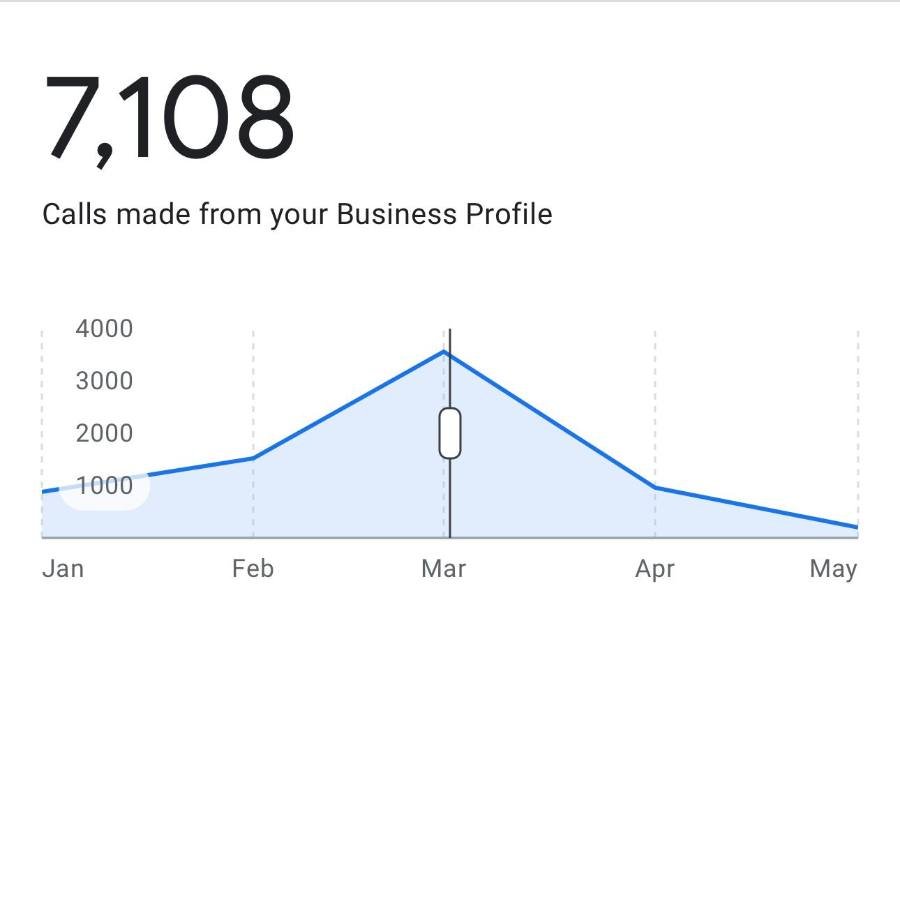
Google gives you free numbers for your profile, including searches, calls, direction requests, website clicks and menu views. Check them every month and look at trends rather than single days. Use Google Search Console for your website to see what people searched before clicking. The goal is not a number on a screen, it is more calls, more bookings and more people through the door.
What results can look like
One UK restaurant we work with grew a fully organic profile with no ad spend to 28,004 interactions, 7,108 phone calls, 6,919 menu views and 3,765 website clicks. You can read how it was done in our case study on 7,108 phone calls from a Google Business Profile. Results differ from one business to the next, and they depend on your competition and your area, but the steps above are the same ones we follow.
Common restaurant SEO mistakes
The most common problems we see are keyword stuffing in the business name, wrong or missing opening hours, a menu that cannot be read online, only a handful of photos, and reviews left unanswered. Fixing these basics often makes a bigger difference than any advanced tactic.
Frequently asked questions
How long does restaurant SEO take?
Fixing your Google Business Profile can change how you look within days, but ranking higher usually takes a few months and depends on how many competing restaurants are in your area.
Is Google Business Profile free?
Yes. Creating and managing a Google Business Profile costs nothing. You only pay if you choose to run ads or hire someone to manage it for you.
Do I need a website for restaurant SEO?
You can rank on Google Maps with only a profile, but a simple website with your menu, address and opening hours as readable text gives Google more to work with and gives customers a reason to click.
Want help getting more customers?
Send us your restaurant name and what you would like to achieve. We reply with a no obligation quote the same day.